2020年7月21日 星期二

Google Forms inserting at top of Sheet

I just wanted to mention some basics of how Google Forms work with the Form Responses 1 tab.

 When you create a Form and it is linked to the Form Responses 1 tab we think the form submissions are appended. But they are not. They are inserted. The form internally kees track of where the new submissions are to be inserted. It works like this by design.

 After the form has been created the first submission will be inserted into roe 2 and the initial row 2 is pushed down and becomes row 3. When the second form submission is received it is inserted into row 3 and the previous row 3 is pushed down and becomes row 4 and so on..

 So if you had pasted data manually from row 2 downwards as you have explained the form still will insert the first form submission into row 2 and push you pasted data down.

 The reason it has been designed to insert is so that data is not automatically overwritten. To demonstrate what I am getting at I created a new test form.

 Below is the spreadsheet that was created and as you can see, before I performed any submissions I when ahead and selected row 2 and highlighted it in yellow.


 Then I entered data into the form, in this case, the first submission.
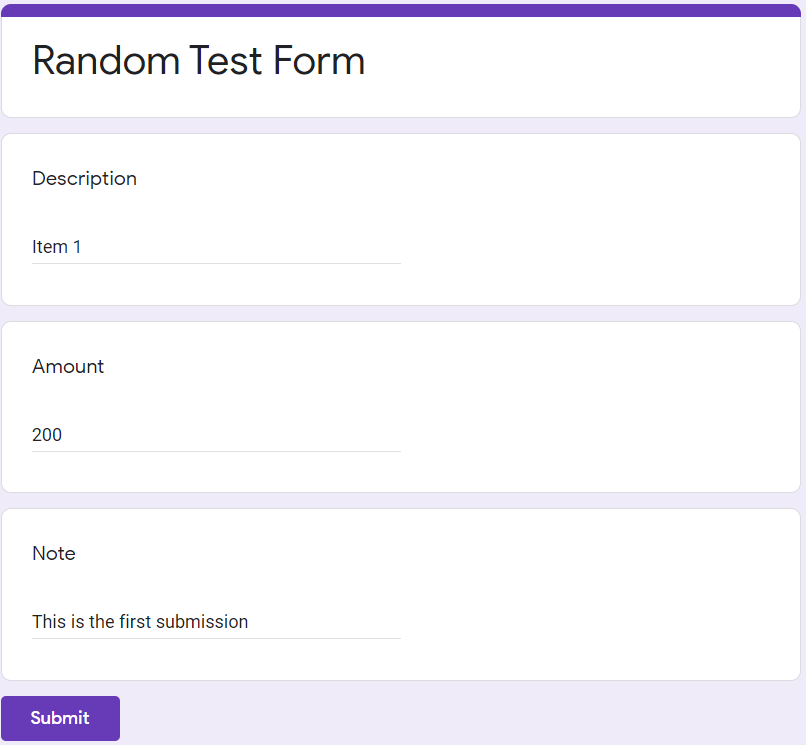
and submitted the form and you will see below the first submission was inserted into row 2 pushing the yellow highlighted row down to row 3


I then called the form up again and entered the second submission and submitted it and you will notice the second submission was inserted in front of the yellow highlighted row pushing it down again.


As you can see, the yellow highlighted row started as row 2 but is now row 4 after the 2 submissions. So this is not a bug. It is how the form submissions are inserted into the Form Responses 1 tab

The next test I did was to insert 2 rows between row 1 and row 2 forcing all the rows below to be pushed down.


I then copied 2 rows of data from somewhere else and pasted it into rows 2 and 3


Then I filled the form in again with the 3rd submission. I then submitted it and you will see below submission 3 was inserted above the yellow highlighted row.


 This demonstrates that the form keeps track of the form submission and inserts then based on that.

So really, if you wanted to have your old data above the form submissions you should have inserted rows between rows 1 and 2 and pasted the data. Then the form submission would have been inserted below the pasted data.

2019年7月10日 星期三

2019年6月25日 星期二

Raspberry Pi 4 Model B 推出了!


Raspberry Pi 4 Model B 規格

  • System-on-a-chip:  Broadcom BCM2711   
  • Processor: Quad-core 1.5GHz Arm Cortex-A72 based processor
  • Memory: 1/2/4GB LPDDR4 RAM
  • Connectivity: 802.11ac Wi-Fi / Bluetooth 5.0
  • Video and sound: 2 x micro-HDMI ports supporting 4K@60Hz displays via HDMI 2.0, MIPI DSI display port, MIPI CSI camera port, 4-pole stereo output and composite video port
  • Ports: 2 x USB 3.0, 2 x USB 2.0
  • Power: 5V/3A via USB-C, 5V via GPIO header
  • Expandability: 40-pin GPIO header


購買:https://www.raspberrypi.org/products/raspberry-pi-4-model-b/

2017年6月27日 星期二

WK<html>toPDF and WK<html>toImage 將網頁轉換為 PDF 或圖像檔

wkhtmltopdf 和 wkhtmltoimage是使用Qt WebKit渲染引擎將 HTML呈現為 PDF 和各種圖像格式的開源(LGPLv3)命令行工具。

運行時完全 headless,不需要顯示或顯示服務。

https://wkhtmltopdf.org/


2017年5月15日 星期一

Microsoft 在 Facebook 對 「WannaCrypt」回應

【Microsoft Hong Kong 提提你 – 請執行 Windows Update 降低被惡意攻擊的風險】 

針對近日「WannaCrypt」網絡攻擊,我們瞭解到所有使用最新 Windows 10 操作系統 (含免費防毒軟件Windows Defender) 並啟用了Windows 更新的用戶都已經得到適當保護,沒有被是次攻擊影響。對於尚未應用安全更新的組織,我們建議你立即部署 Microsoft安全公告 MS17-010:https://aka.ms/rancms。

同時,為了更有效保護所有 Windows 用戶,我們已特別為使用早期軟件,包括Windows XP、Windows 8 和Windows Server 2003 的用戶提供了更新,用戶可在此連結下載安全更新:https://aka.ms/ranc。

此外,我們亦迅速將更新分享給其他防毒軟件和安全軟件公司,以便為沒有開啟 Windows 自動更新的用戶提供保護。更多資料,請瀏覽微軟安全事故協調中心(MSRC)博客:https://aka.ms/ranguidance。


2017年4月12日 星期三

樹苺派 (Raspberry Pi) 在 Raspbian 登入桌面時執行某程式或 scripts


在 Raspbian 中如果要在登入桌面時執行某程式或 scripts,可在以下目錄中

/home/pi/.config/lxsession/LXDE-pi

修改 autostart 檔案,如下:

@lxpanel --profile LXDE-pi
@pcmanfm --desktop --profile LXDE-pi
@xscreensaver -no-splash
加入要執行的 commands

2017年3月4日 星期六

樹莓派3 Raspberry Pi 3 - 超音波 (HC-SR04 超聲波測距模組) 測距,並在4位7段數字屏上顯示結果


超音波測距的方式是發射一個電波,當電波遇到物體反射回來,再被測距儀偵測到反射電波,利用來回時間與音波的速度算出距離,計算公式如下:

距離 = (音波發射與接收時間差 * 聲音速度(343m/s)) / 2

聲音的速度,在一般空氣中約為每秒 343m,因來回時間要將距離除以 2,才是單程的距離。實際的聲音速度決定於好幾個環境因素,其中一個是溫度,計算時,需將環境因素考慮在內,才能更精確計算距離。

我在淘寶購買的是型號 HC-SR04 的超聲波測距模組,這個模組最遠可測得 2cm ~ 400cm, 輸入電壓大約 2.4V ~ 5.5V,工作電流大約 15mA,偵測廣度大約是15度。

基本工作原理:

  1. 利用HC-SR04 超聲波測距模組的 TRIG觸發測距,給至少10us的高電平信號;
  2. 模組自動發送 8個 40khz的方波,自動檢測是否有信號返回;
  3. 有信號返回,通過 ECHO輸出一個高電平,高電平持續的時間就是超聲波從發射到返回的時間。

2017年3月3日 星期五

樹莓派 Raspberry 五歲慶生辰 RPi Zero W 無線加持


喜歡DIY的朋友,一定知道樹莓還有一個尚未在港發售的兄弟「Raspberry Pi Zero」(RPi Zero)。它的體積細小,而且只售5美元(約38港元),讓各位愛好者創造出像智能滑板等玩意。乘著樹莓面世五周年,廠方推出新一代無線版本RPi Zero W。


news-images
RPi Zero W有無線網絡加持,但尺寸跟舊版相同。

2017年2月28日 星期二

樹莓派3 Raspberry Pi 3 - 使用 74HC595 Shift Registor 及 3 個 GPIO 控制 8 顆 LED


74HC595 接腳位的圖片說明:


Source: pimoroni.com


腳位編號名稱說明
1-7, 15Q0 ~ Q7輸出腳位
8GND接地
9Q7’序列輸出 (Serial Out)
10MRMaster Reset, 清除所有資料, 低電位有效
11SH_CPSHift register clock pin (Clock Pin)
12ST_CPSTorage register clock pin (Latch Pin)
13OEOutput Enable, 允許輸出,低電位有效 (Active low)
14DS序列資料輸入 (Serial data input)
16Vcc供應電壓


2017年2月25日 星期六

樹莓派3 LCD 資訊看板 Raspberry Pi 3 LCD Info Board


利用 16x2 LCD顯示屏偱環顯示:

1. 當前日期和時間
2. 樹莓派 IP 地址
3. 室內溫度和濕度
4. CPU溫度和使用
5. RAM使用情況
6. SD卡使用情況


電子零件:
  1. 麵包皮 x 1
  2. LCD 16x2 字元顯示屏 x 1
  3. 10K可變電阻 x 1
  4. DHT11 溫度、濕度感應器 x 1
  5. 開關按鈕 x 1
  6. 陶瓷電容 x 1
  7. 330Ω 電阻 x 1
  8. 10KΩ電阻 x 2
  9. 母對公、公對公杜邦線數條 

2017年2月22日 星期三

使用樹莓派3 (Raspberry Pi 3) 作為 Wifi 熱點


Source:
https://frillip.com/using-your-raspberry-pi-3-as-a-wifi-access-point-with-hostapd/

Packages

The first step is to install the required packages: sudo apt-get install dnsmasq hostapd
I'll go into a little detail about the two:
  • hostapd - This is the package that allows you to use the built in WiFi as an access point
  • dnsmasq - This is a combined DHCP and DNS server that's very easy to configure

Configure your interfaces

The first thing you'll need to do is to configure your wlan0 interface with a static IP.
If you're connected to the Pi via WiFi, connect via ethernet/serial/keyboard first.

2017年1月13日 星期五

CMHK 推出上台無需簽約,數據無限期的 MySim

MySim是一個全新流動通訊服務,購買可用有效信用卡(VISA /MasterCard)、「銀聯在綫支付」(銀聯信用卡/儲蓄卡^)或支付寶資料網上付款。
購買程序簡單:
1.選購MySim流動通訊服務
 - 填妥電子訂購表格 (包括郵寄地址),並於網上繳付基本服務費用
2.啟用SIM卡
- SIM卡将以郵寄方式送到指定地址
- 攜號轉台客戶或CMHK 客戶需親身到門市併帶備所有文件(如身份證)辦理轉台手續或更改服務計劃手續及領取SIM卡

3.登記賬戶後增值及選購本地數據


2016年8月10日 星期三

使用 7-ZIP 解除有密碼保護的 Excel 工作表

這種方式只適用於在Excel文件 的.xlsx 格式的的。因此,如果您的Excel工作簿是.xls格式,只需打開它,然後將其保存為.xlsx格式:

第1步 更改從的.xlsx Excel文件擴展名更改為.zip。
Rename extension

第2步 打開ZIP文件。打開文件夾 XL->工作表 ,你可以看到三個 sheet.xml 文件。選擇 sheet1.xml 文件。右鍵單擊它並選擇 編輯。選擇用 記事本打開它
Edit Sheet

第3步: 刪除與開頭的標籤 sheetProtection。然後保存並關閉 sheet1.xml 文件:
Delete sheetProtection tag

第4步 更新修改 sheet1.xml 出現提示時的ZIP文件文件。然後關閉ZIP文件
Update modified file

步驟5: 更改ZIP檔的副檔
名回到原來的.xlsx。

2016年5月25日 星期三

華龍 4G 一年電話卡

可帶號碼轉台! 每月$16 包通話、上網!


即插即用,無需登記 
預設特長一年有效 
特設 *777 專線 ,用戶可自主更改為月費計劃,或因應個人需要隨時增加數據或分鐘用量 
致電內地:免費
致電本地 : 每分鐘收費低至0.2元
致電泰國 : 每分鐘收費低至0.45元
致電美國及加拿大:每分鐘收費低至0.12元
發送短訊至中國、台灣、馬來西亞、新加坡、巴基斯坦、印度及孟加拉:每則短訊0.7元
發送至世界其餘地區:每則短訊1元
利用e-轉賬服務把儲值額轉移至其他華龍流動儲值卡賬戶
接駁鈴聲服務
多媒體訊息(MMS)